Side Menu

Brand Switching

Lorem ipsum dolor sit amet, consectetur adipiscing elit. Ut elit tellus, luctus nec ullamcorper mattis, pulvinar dapibus leo.

1. Inputs

  1. Search for and select ATC’s of interest.
    1. Search works on both ATC Code and ATC Description (see full Glossary for complete listing).
  2. Selected ATCs appear in the central column; selecting the dropdown displays the list of drugs in the ATC.
  3. Select ONE ATC for calculation and it will appear in the list on the right of the screen.
  4. Select CALCULATE and the Brand Switching analysis for your selected ATC will run.
  5. Once calculation is complete (usually 10-15 seconds) the download CSV button appears. Selecting this allows you to download the CSV of results.

2. Outputs

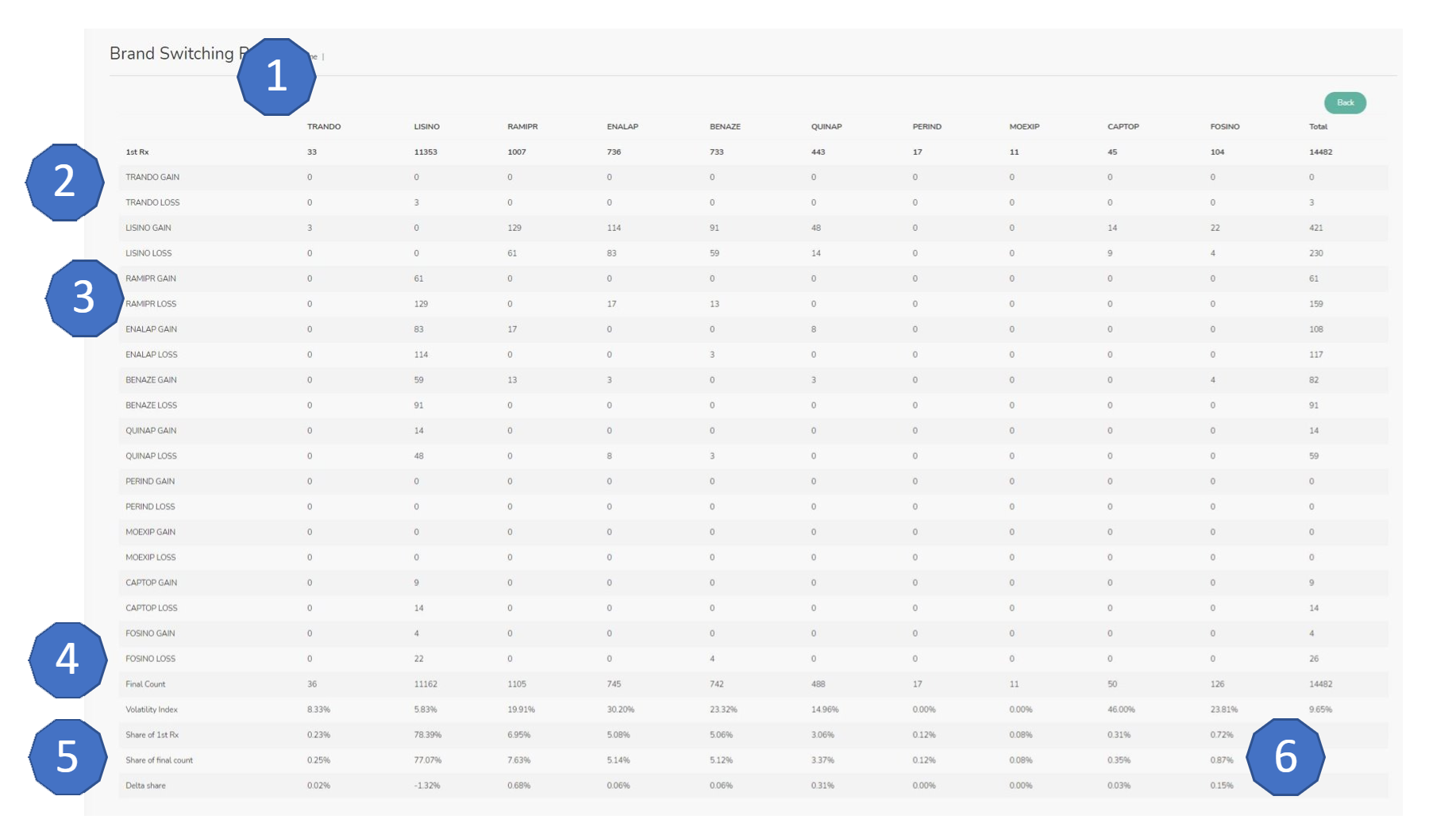
  1. All brands in the selected ATC have a column​;
  2. First Rx is the number of patients for whom the drug was the first Rx found in the data;
  3. Gains and losses show how patients were switched out of and into all the products​;
  4. Final Count is the count of patients for who each drug was the last Rx in the data​;
  5. Volatility Index is a measure of how much each drug is switched (total gains and losses / Final Count)​;
  6. Shares show share of first and last count as well the change between these two.​